You would think that loading images in the browser is a solved problem. After all, websites are basically composed of text and images.
Turns out that loading images from JavaScript to use in WebGL/WebGPU applications is not nearly as simple or well supported as it should be. There are several APIs for it, and the right choice depends on which browser you are targeting. They each have different performance characteristics, and some have unexpected behaviors or outright bugs.
This is surprising considering that loading images is one of the most fundamental things a browser does.
Both WebGL and WebGPU make it fairly easy to create a texture from various image representations.
In WebGL the gl.texImage2D function accepts two types of sources, a TypedArray or a DOM pixel source. The latter includes any of these objects:
ImageBitmapImageDataHTMLImageElementHTMLCanvasElementHTMLVideoElementOffscreenCanvasVideoFrame
Similarly, in WebGPU we can populate GPUTexture objects using queue.copyExternalImageToTexture which accepts the same DOM pixel sources.
With all these options, it’s up to the developer to choose what pathway to use. Sometimes the image data is already in a particular form and the choice is made for you. But most of the time you’re fetching an image from a URL, and the question becomes: which API gets the pixels onto the GPU fastest?
As we will see, WebGPU is still a young API with immature implementations, and depending on the pathway you pick, you can also run into color space bugs or formats that simply don’t work.
createImageBitmap
The createImageBitmap method returns a promise that resolves to an ImageBitmap and, in theory, it provides an asynchronous and resource-efficient pathway to prepare textures for rendering in WebGPU and WebGL that is widely supported across browsers.
Like the WebGL and WebGPU APIs, it accepts a variety of image sources, but the most useful input is a Blob. This gives us a clean separation between fetching the image and decoding it:
export async function loadImageBitmap(url) {
  const res = await fetch(url, { mode: "cors" })
  if (!res.ok) throw new Error(`HTTP ${res.status} for ${url}`)
  const blob = await res.blob()

  return createImageBitmap(blob, {
    imageOrientation: "none",
    colorSpaceConversion: "none",
    premultiplyAlpha: "none"
  })
}
Additionally it provides fine grained control over the image orientation, color space conversion and alpha format, which are features missing from the other pathways.
Unfortunately, there are some issues:
- SVG support is inconsistent. While the API promises support for SVG, the quality of the resulting images depends on the browser. Firefox produces the expected output, but in Safari and Chrome the resulting images are not antialiased. Additionally, if you provide an SVG file inside a blob (instead of an
SVGImageElement) Chrome does not produce valid output. - Color space conversion bugs. Safari has known issues when passing
ImageBitmaptocopyExternalImageToTexture(bug 296208, and 295729). These issues are fixed in Tahoe/iOS 26, but given the low adoption rate of this release they are worth keeping in mind. - Asynchronous does not mean concurrent. The asynchronous nature of the API allows browser implementations to offload the decoding to a separate thread, but in practice the only browser that seems to do this is Chrome. In Firefox decoding is serial (bug 1778394) and Safari is slow, although I haven’t pinned down why.
Even though on paper createImageBitmap is the right API, in practice we have to look at the other alternatives to find more efficient solutions or work around deficiencies in the implementations.
Summary:
- Chrome: Poor SVG support.
- Safari: Poor SVG support. Color space conversion bugs.
- Firefox: Correct, but synchronous. Decoding in the main thread.
HTMLImageElement
The HTMLImageElement interface represents an HTML <img> element, which we can hand over to the WebGL and WebGPU APIs directly. To create an image element asynchronously we can wrap it in a promise that is fulfilled when the image finishes loading:
export function loadImageElement(url) {
  return new Promise((resolve, reject) => {
    const img = new Image()
    img.crossOrigin = "anonymous"
    img.decoding = "async" // hint to decode off the main thread when possible
    img.onload = () => resolve(img) // returns HTMLImageElement
    img.onerror = reject
    img.src = url
  })
}
The decoding attribute is an optional string representing a hint given to the browser on how to decode the image. async means to decode it asynchronously. In practice the hint doesn’t seem to make much of a difference. Firefox still decodes synchronously in the main thread, and Safari appears only slightly faster.
One of the drawbacks of this API is that there’s no way to specify the intended color space conversion or alpha format. This is a problem when loading images that are not intended for display, for example, normal maps or other texture data stored in linear space. In those cases Chrome seems to apply an sRGB transform, and produces washed-out colors, while Safari and Firefox leave the data as is. It’s unclear which behavior is correct, but for texture loading, Chrome’s transform makes this method unusable.
This code path also supports loading SVG files, and in most cases the quality of the results is much better. However, prior to Safari 26, loading of image elements referencing SVG files was broken. A workaround is to render the SVG to a canvas which both WebGL and WebGPU accept as an input:
async function convertImageElementToCanvas(img) {
  const canvas = document.createElement("canvas")
  canvas.width = img.naturalWidth || img.width
  canvas.height = img.naturalHeight || img.height
  const ctx = canvas.getContext("2d")
  ctx.drawImage(img, 0, 0)
  return canvas
}
With this fix, loading of SVG files through the HTMLImageElement code path produces correct results in all cases.
Summary:
- Chrome: Inconsistent color space conversion.
- Safari: Fastest option. Issue with SVG.
- Firefox: Still synchronous.
ImageDecoder
A third alternative is to use the new WebCodecs API. Adoption of this API has been limited, because it’s only available in Chrome and Firefox. I was excited to try it out, because I had heard rumors about it being hardware accelerated. Probably not true, but the rumor itself suggested it might at least be faster than the alternatives.
The code to use the ImageDecoder API is fairly simple:
const decoder = new ImageDecoder({
  data: blob.stream(),
  type: blob.type,
  colorSpaceConversion: "none",
  preferAnimation: false
})

try {
  // Returns a VideoFrame; caller is responsible for calling .close() on it.
  const { image } = await decoder.decode()
  return image
} finally {
  decoder.close()
}
decoder.decode() returns a promise to an object with an image attribute containing a VideoFrame and we can create a texture from this VideoFrame directly. Like createImageBitmap, this code path supports specifying the desired color space conversion, but unlike it, there’s no way to specify the expected alpha format.
There’s another caveat, in Firefox copyExternalImageToTexture does not support VideoFrame. This is a known issue that has already been reported at: bug 1975308, but the workaround is fairly simple. We just wrap the VideoFrame object in an ImageBitmap. This is something that spark.encodeTexture already handles in order to support arbitrary video sources:
if (getFirefoxVersion() && isVideoFrame) {
  const bitmap = await createImageBitmap(source)
  try {
    return await this.encodeTexture(bitmap, options)
  } finally {
    bitmap.close()
  }
}
To benchmark this I used the glTF Sponza scene I tested on a previous blog post.
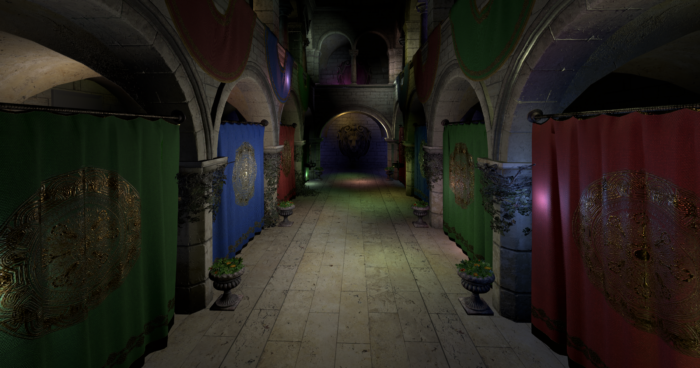
Here are the results:
| Browser | createImageBitmap | ImageDecoder.decode |
|---|---|---|
| Chrome | 177 ms | 163 ms |
| Firefox | 460 ms | 196 ms |
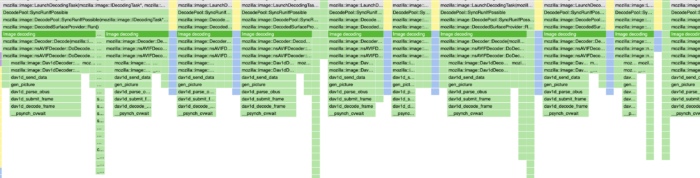
The improvements in Chrome are modest, but on Firefox the difference is dramatic, suggesting the texture decoding finally happens off the main thread. Here’s a flame graph of the version of the code using createImageBitmap, note how most of the time is spent in image decoding (in green):
With ImageDecoder, the decoding time is gone entirely, and most of the time is spent on WebGPU’s copyExternalImageToTexture (in blue):
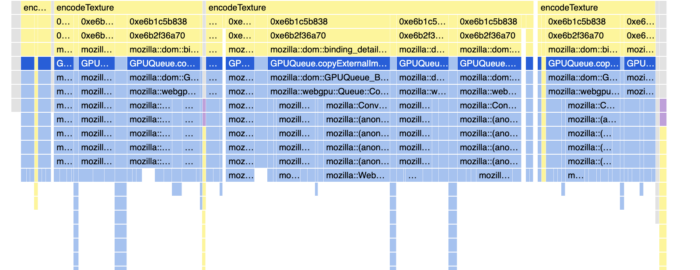
However, while the overall time is reduced, we are now spending a significant amount of time copying data, and in particular, doing pixel format conversions. Turns out that the VideoFrame internal format is BGRA8 and our WebGPU texture is RGBA8.
I spent some time looking at that code to understand what I could do about that.
The ConvertImage function has a fast path for no-pixel format conversion that just performs memory copies, and a slow path that uses a generic WebGLImageConverter. Firefox actually has some optimized pixel swizzling functions that have SSE2 and NEON implementations (gfx::SwizzleData and gfx::SwizzleYFlipData). I tried hooking them up and produced a noticeable improvement, but a better approach is to avoid the pixel conversion entirely.
Changing the pixel format used by Firefox internally would be tricky. There’s a lot of code that expects that particular format. Instead it’s much easier to change the format of our destination texture. We only use this intermediate texture as a staging texture prior to block compression and it doesn’t matter whether it uses RGBA8 or BGRA8. Allocating a BGRA8 texture puts us in the optimized memory copy path.
The resulting timings are even better (note, I did not measure this change in Chrome):
| Browser | createImageBitmap | ImageDecoder -> RGBA | ImageDecoder -> BGRA |
|---|---|---|---|
| Firefox | 460 ms | 142 ms | 116 ms |
This is a nice improvement, but I’m still not satisfied with this outcome. The remaining copy is necessary in Firefox, because WebGPU runs in a different process and in order to transfer the texture we have to place it in shared memory that is specifically allocated for this purpose. In an ideal world we would have the decoder thread output its result directly into shared memory, so that the main thread only has to hand it over to the GPU process without touching it.
Another problem that still remains is that textures with alpha still go through a pixel format conversion. Turns out that the alpha channel in VideoFrame objects is always premultiplied. On the other hand copyExternalImageToTexture expects unpremultiplied alpha by default, so the pixel format converter has to divide the RGB by the alpha.
Unfortunately, there appears to be no way to specify that the alpha in the VideoFrame is not to be premultiplied. We can eliminate the un-premultiplication, by requesting premultiplied data in copyExternalImageToTexture, but that’s not what most applications want; often the alpha in game textures is used to encode data that’s not opacity.
This is worrying not just because of the minor overhead, but because of potential quality issues. Premultiplication followed by unpremultiplication is a lossy transformation, it completely destroys RGB data in areas that are fully transparent, and when the alpha is close to zero the reconstruction is inaccurate and often leads to fireflies. You can see an example on the texture below:

The RGBA codecs in spark.js assume that alpha is used for opacity and handle input like this gracefully, but this is still an issue if you intend to use the alpha channel for other purposes and don’t want it to interfere with the color.
Finally, another issue is that support for the BGRA8 format is intentionally limited in WebGPU. It does not support STORAGE_BINDING unless the "bgra8unorm-storage" feature is supported and enabled, and even then, this only enables write-only access. That puts some serious restrictions in how we can use these textures.
For example, we cannot use our compute mipmap generation without adding an extra blit. Currently Firefox does not support the compute-based mipmap generation because support for views with different pixel formats is also broken, but once that’s fixed this will add some overhead and additional complexity to that code path.
Summary:
- Chrome: Minor improvement. Possible alpha quality degradation.
- Safari: Not available.
- Firefox: Asynchronous and concurrent. Still some copy overhead. Alpha quality degradation.
Conclusions
I spent quite a bit of time looking at performance in Firefox because it’s my browser of choice and also because I feel it has much fewer engineering resources than Chrome or Safari. That said, some of the issues I identified probably apply to the other browsers; I suspect the BGRA staging texture trick is worth trying regardless of your target.
Summary:
- For raster images:
- Chrome:
createImageBitmapworks as advertised, concurrent decoding, correct color handling. - Safari: use
HTMLImageElement. It’s faster thancreateImageBitmapand avoids bugs in pre-Tahoe versions. - Firefox: use
ImageDecoder. It’s the only API on Firefox that decodes off the main thread.
- Chrome:
- For vector images: use
HTMLImageElementor render to canvas in Safari prior to version 26.
So much for portability of web APIs! The nice thing is that at least you can use spark.js to abstract all that complexity.
I intend to keep updating spark.js to enable the fastest texture upload path possible and to work around all the wrinkles in each of the browsers. It would be great if some of the issues I’ve identified were fixed over time, but in the meantime spark.js provides a practical solution that’s available today.
On that note, here’s a wish list of things that would make this whole landscape simpler, both for spark.js and for anyone else trying to load images efficiently on the web:
- A simple way to upload image data without having to perform memory copies, pixel format conversions or alpha unpremultiplication in the main thread.
createImageBitmapis probably the right API for this, it just needs consistent implementation across all browsers. - Lower level access to raw pixel data in YUV format, as produced by the decoder. Since our primary goal is to upload the pixel data to the GPU, performing the color conversion there would make more sense than doing it in the CPU.
- Support for HDR images. AVIF, JPEG and HEIF all have HDR variants, and some of them are supported by browsers in
<img>elements, but the output is always tone mapped. 3D applications need access to untonemapped data in aUint16Array/ float buffer. Or direct access to the raw color and gain maps.