The Spark codecs are often bandwidth-bound. The codec usually reads an uncompressed RGBA8 texture and outputs a block-compressed texture that, depending on the format, is 2–8 times smaller. Reading the input is what dominates bandwidth. When bandwidth-bound, execution stalls waiting for input data, while the GPU tries to hide that latency by overlapping loads for some blocks with computation on others.
Mobile GPUs render one tile at a time and keep its data in on-chip memory to save bandwidth and power. Wouldn’t it be great if our codecs could also use this tile memory as their input? That’s exactly what Metal tile shaders allow us to do.
When I started working on Spark I was very excited about the possibilities of using tile shaders, but when I tried them on an iPhone 12 and M1 MacBook Pro the results were underwhelming. There seemed to be scheduling issues that caused the combined fragment + tile shader to run at a fraction of the speed of the individual shaders.
The difficulties were understandable: On Apple GPUs a tile is typically 16×16 to 32×32 pixels, and to encode it we use a single thread for each 4×4 block. The tile dispatch has to wait for that tile’s fragment work to finish, and 16–64 threads is a small threadgroup to hide latency with. In most cases the fragment shader is relatively simple and has high occupancy, while the encoder is much more complex and tends to have lower occupancy. Scheduling that work effectively seemed quite challenging, so my initial excitement faded.
However, a few months ago some Apple folks mentioned that the performance of tile shaders had improved in recent OS versions. I didn’t have high hopes, but I tested it again on a wider array of devices and to my surprise the results were much better. This could be attributed to many factors: improvements in the codecs, updated compiler, better testing methodology, different architectures, and OS updates.
Today the tile path is 1.2–1.7× faster than a separate compute pass, and on most of the iPhones it’s as fast as or faster than writing to the uncompressed texture, essentially making real-time texture encoding free.
The benefits of running the codecs in the tile shader do not end there. Lower bandwidth results in lower power consumption, and the uncompressed render target is never stored, so it can be memoryless, saving the allocation entirely.
How to use tile shaders?
In order to use the tile shader in Metal you need a device with at least an Apple4 GPU (A11) or later, running on iOS 11 or macOS 11.
1. The encode kernel
Include the single-header Spark codec and write a tile kernel. Each thread reads one 4×4 block from the imageblock and encodes it:
#define SPK_ENABLE_FP16 1
#define SPK_ENABLE_INT16 1
#include "spark_astc.metalh"

struct ColorData {
    half4 color [[color(0)]];
};

kernel void encode_tile(imageblock<ColorData> img,
    ushort2 tile_coord  [[thread_position_in_threadgroup]],
    ushort2 gid         [[thread_position_in_grid]],
    ushort2 grid_blocks [[threads_per_grid]],
    device uint4* output [[buffer(0)]])
{
    half3 block[16];
    for (ushort y = 0; y < 4; y++)
        for (ushort x = 0; x < 4; x++)
            block[4 * y + x] = img.read(4 * tile_coord + ushort2(x, y)).color.rgb;

    uint idx = uint(gid.y) * grid_blocks.x + gid.x;
    output[idx] = spark_encode_astc_4x4_rgb(block, /*quality=*/1);
}
2. Allocate a memoryless render target
The render pass needs a color attachment, but its contents never leave tile memory, so use the MTLStorageModeMemoryless storage mode to avoid allocating memory for it:
MTLTextureDescriptor* d = [MTLTextureDescriptor
	texture2DDescriptorWithPixelFormat:MTLPixelFormatRGBA8Unorm width:w height:h
	mipmapped:NO];
d.storageMode = MTLStorageModeMemoryless;
d.usage = MTLTextureUsageRenderTarget;
id<MTLTexture> tile_target = [device newTextureWithDescriptor:d];
3. Set up the tile pipeline
MTLTileRenderPipelineDescriptor* td = [MTLTileRenderPipelineDescriptor new];
td.tileFunction = [library newFunctionWithName:@"encode_tile"];
// same format as the attachment
td.colorAttachments[0].pixelFormat = MTLPixelFormatRGBA8Unorm;
// one thread per 4x4 block, not per pixel
td.threadgroupSizeMatchesTileSize = NO;

id<MTLRenderPipelineState> tile_pso = [device
	newRenderPipelineStateWithTileDescriptor:td options:0
    reflection:nil error:&error];
4. Render, then encode, in one pass
Draw your content as usual, then dispatch the tile kernel in the same render encoder:
MTLRenderPassDescriptor* rp = [MTLRenderPassDescriptor renderPassDescriptor];
rp.colorAttachments[0].texture = tile_target;
rp.colorAttachments[0].loadAction = MTLLoadActionDontCare;
rp.colorAttachments[0].storeAction = MTLStoreActionDontCare;  // required for a memoryless target

id<MTLRenderCommandEncoder> enc = [cb renderCommandEncoderWithDescriptor:rp];

// ... draws that fill the color attachment ...

[enc setRenderPipelineState:tile_pso];
[enc setTileBuffer:output_buffer offset:0 atIndex:0];
[enc dispatchThreadsPerTile:MTLSizeMake(enc.tileWidth/4, enc.tileHeight/4, 1)];
[enc endEncoding];
You can force a specific tile size rp.tileWidth and rp.tileHeight, not specifying them let’s the driver choose it automatically, and you can query the chosen values with enc.tileWidth and enc.tileHeight.
The tile dispatch runs after all earlier draws in the render pass have finished and it processes the final pixels.
A full example showcasing this is included in the Spark 1.4 SDK.
What are the results?
To benchmark this I generated the render target with three different shaders: a math-heavy procedural texture, a minimal shader with just a simple gradient, and terrain-splatting shaders like those used in virtual texture pipelines. They all behaved similarly, but the gains were largest on the terrain example, which is also the most realistic scenario, so it’s the one I’m presenting here.
The following are timings in milliseconds of rendering a 1024×1024 terrain texture and encoding it to ASTC 4×4 at medium quality (Q1).
| Device | OS | Uncompressed | Compute | Tile | Tile vs Compute |
|---|---|---|---|---|---|
| iPhone 8 – A11 | iOS 16.7.16 | 0.839 | 1.184 | 0.834 | 1.42x |
| iPhone 12 – A14 | iOS 26.6.2 | 0.470 | 0.782 | 0.567 | 1.38x |
| iPhone 15 Pro – A17 | iOS 26.6.1 | 0.311 | 0.497 | 0.301 | 1.65x |
| iPhone 16 – A18 | iOS 18.7.3 | 0.332 | 0.477 | 0.317 | 1.50x |
| M4 MacBook Pro | macOS 15.7.7 | 0.073 | 0.119 | 0.098 | 1.21x |
To get stable measurements I ran each test 256 times and averaged the results. I also changed the GPU performance state to medium in order to obtain more stable clocks, so these results are not representative of peak performance.
On every device I measured, the tile path beats the separate compute pass by 1.2–1.7×. On three of the four iPhones (A11, A17, A18), producing the compressed texture in the Tile Shader is as fast or faster than writing the uncompressed one. The MacBook Pro benefits less, probably because it has more bandwidth and larger caches, so the uncompressed store is not the bottleneck. It’s unclear why the A14 lags behind.
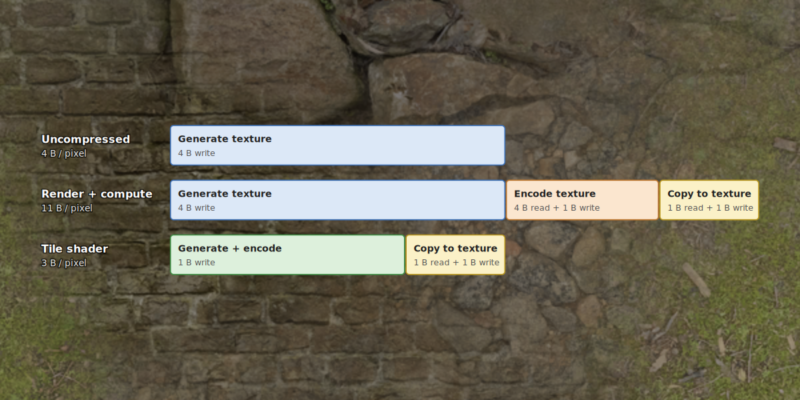
The following diagram illustrates where the time goes (box lengths are approximate, not to scale):
The compute path first writes the uncompressed RGBA8 texture (4 B/pixel), reads it back (4 B/pixel), writes the ASTC output to a buffer (1 B/pixel), and finally copies that buffer into the compressed texture (another 2 B/pixel for the read and write): 11 bytes of memory traffic per pixel.
The tile path eliminates the uncompressed write and read entirely. It encodes directly from tile memory, leaving only the compressed output and its final copy: 3 bytes per pixel. That’s even less traffic than simply writing the 4-byte-per-pixel uncompressed render target, which explains how rendering and encoding together can be as fast as rendering alone.
These numbers exclude texture sampling, which is identical across all three paths.
I double-buffered the output buffers and render targets so the copy overlaps with the next pass. Writing directly to the compressed texture through heap aliasing, as described in this earlier post, would remove the copy and narrow the gap to uncompressed further, but it isn’t officially supported, so I didn’t use it here.
Conclusions
Tile shaders make runtime texture compression considerably more attractive on Apple GPUs. Instead of rendering an uncompressed texture to memory and reading it back for compression, Spark can encode directly from tile memory.
That means the usual benefits of compressed textures (lower memory use, lower bandwidth, and faster subsequent rendering) can be obtained without paying a significant runtime encoding cost.
Tile shaders are not exclusive to Apple hardware. They are also available on Qualcomm GPUs under Vulkan through the VK_QCOM_tile_shading extension. I haven’t yet experimented with it, but I will as soon as I can get my hands on a device supporting it.