One of the things I’ve always lamented about hardware image formats is the slow pace of innovation. Developers were usually unwilling to ship textures in a new format unless that format was widely available. That is, the format had to be supported in the majority of the hardware they were targeting, and must be supported across all vendors.
For example, even though ATI introduced the 3Dc formats in 2004 with the Radeon X800 (R420) and exposed them through D3D9 extensions, in practice their use did not become widespread when Direct3D 10 standardized them as BC4 and BC5 in 2007, but only when Direct3D 10 became the minimum hardware requirement.
Crysis was the first major game which shipped with BC5 textures, but most games were not willing to have such a steep hardware requirement until many years later. To avoid these adoption delays, the BC6 & BC7 formats were designed in collaboration between ATI and NVIDIA for inclusion in Direct3D 11.
Hardware development cycles are already long, and for a new format to gain adoption it needs to be proposed for standardization, which often makes the process even longer.
This is one of the reasons why I find real-time texture compression so exciting. When the encoder runs in real-time it’s a lot easier to introduce new hardware formats, because adopting a new format no longer requires waiting for content to be created targeting it.
In a previous post I mentioned hardware compression as an alternative to real-time compression. The details of these formats are not documented anywhere and their use is completely transparent, applications do not need to target these formats explicitly, instead the driver compresses textures dynamically during rendering and image uploads.
Today, there are three competing hardware image compression formats: ARM’s AFRC, ImgTec’s PVRIC4, and Apple’s ‘lossy’ (for lack of a better name). In this post I’ll take a closer look at how these formats are used, what quality we can expect from them, and how they perform compared with Spark, my real-time texture compression library.
Let’s start with Apple’s implementation.
Metal
Apple introduced lossy texture compression in the A15 and M2 chipsets (which share the same GPU generation). Enabling it results in a 1:2 compression ratio.
Metal’s lossy compression is remarkably easy to opt into. The API surface is minimal, the compressionType property on MTLTextureDescriptor takes a value from the MTLTextureCompressionType enum, and setting it to MTLTextureCompressionTypeLossy is often the only required change.
MTLTextureDescriptor *descriptor = [MTLTextureDescriptor
    texture2DDescriptorWithPixelFormat:MTLPixelFormatRGBA8Unorm
    width:width
    height:height];
descriptor.usage = MTLTextureUsageRenderTarget | MTLTextureUsageShaderRead;
descriptor.storageMode = MTLStorageModePrivate;
descriptor.compressionType = MTLTextureCompressionTypeLossy;

id<MTLTexture> texture = [device newTextureWithDescriptor:descriptor];
The Metal Feature Set Tables indicate that all ordinary pixel formats support lossy compression, this includes 10 bit and floating point formats, which I think is quite remarkable. I ran some tests and can confirm that this is indeed the case, but so far I’ve focused my tests on R8, RG8 and RGBA8 formats.
In terms of quality the R and RG formats perform better than the Spark EAC codecs, but worse than the BC4 and BC5 codecs:
| R | Metal Lossy (1:2) | BC4 Medium (1:2) | BC4 High (1:2) | EAC_RG Low (1:2) | EAC_RG Medium (1:2) | EAC_RG High (1:2) |
|---|---|---|---|---|---|---|
| RMSE | 1.8579 | 1.8469 | 1.7149 | 2.3399 | 2.2922 | 1.8636 |
| RG | Metal Lossy (1:2) | BC5 Medium (1:2) | BC5 High (1:2) | EAC_RG Low (1:2) | EAC_RG Medium (1:2) | EAC_RG High (1:2) |
|---|---|---|---|---|---|---|
| RMSE | 3.1757 | 3.3099 | 3.0442 | 4.2261 | 4.1592 | 3.3601 |
It’s not possible to do a direct comparison between the lossy RGBA8 codec and the formats Spark can target, because the compression ratios are different, Metal lossy only supports 1:2 compression ratios, while Spark RGB(A) formats are 1:4, but let’s include the results for completeness:
| RGBA | Metal Lossy (1:2) | ASTC 4×4 Low (1:4) | ASTC 4×4 Medium (1:4) | ASTC 4×4 High (1:4) | BC7 Low (1:4) | BC7 Medium (1:4) | BC7 High (1:4) |
|---|---|---|---|---|---|---|---|
| RMSE | 1.4947 | 6.2994 | 5.9686 | 5.3637 | 5.7213 | 5.3585 | 4.2136 |
In terms of performance the lossy formats perform very well and tend to saturate memory bandwidth if the size of the texture is large enough. I ran some tests on my M4 Pro (16 GPU core). The following table shows results in MPix/sec for two different sets of textures with different sizes:
| Method | 4096 | 2048 | 1024 | 512 | 256 |
|---|---|---|---|---|---|
| Uncompressed (blit) | 41,618 | 26,680 | 43,749 | 70,111 | 44,939 |
| Metal Lossy (blit) | 41,807 | 40,847 | 43,100 | 69,873 | 48,729 |
| BC7 High (GPU) | 35,563 | 42,230 | 37,082 | 34,224 | 10,985 |
Note how the throughput of the standard blits remains fairly consistent regardless of the texture size. On the other hand, the Spark codecs appear to have a fixed overhead that becomes more significant as the texture sizes decrease. The speed boost of the blits at 512 x 512 is interesting and warrants further investigation, as I don’t have a good explanation for it.
Note also that the Spark codecs need to perform an additional copy from the output buffer of the codec, to the final compressed texture. Even with a fast bump allocator that doesn’t have hazard tracking, there’s still some overhead that could be avoided if Metal supported writes to block compressed textures, like Vulkan does.
The way the lossy formats work internally is quite interesting. The lossy formats I’ve inspected all use an 8×4 block size and resemble some of the features of the ETC and EAC formats. Even though they claim 1:2 compression, in practice there’s one byte of meta data allocated for each block, so the total memory use is slightly higher than advertised.
I’ve fully reverse engineered the block encoding corresponding to some of the lossy formats, but for now I’ll spare you the details. I may document my findings in another blog post.
Vulkan
On Vulkan, the VK_EXT_image_compression_control extension gives applications a way to request fixed-rate compression for images. This extension is already available on flagship devices from Arm and Imagination.
As you would expect enabling lossy image compression in Vulkan is a bit more verbose than in Metal, but in practice, not much more complicated. The only thing we need to do is to extend the VkImageCreateInfo structure by chaining the VkImageCompressionControlEXT structure to it.
We can use the VK_IMAGE_COMPRESSION_FIXED_RATE_DEFAULT_EXT flag to let the implementation choose any fixed rate compression setting:
VkImageCompressionControlEXT compression_control = { 0 };
compression_control.sType = VK_STRUCTURE_TYPE_IMAGE_COMPRESSION_CONTROL_EXT;
compression_control.flags = VK_IMAGE_COMPRESSION_FIXED_RATE_DEFAULT_EXT;
compression_control.pFixedRateFlags = nullptr;
Alternatively, you can specify explicit fixed-rate flags to control the allowed compression ratios. For example:
VkFlags fixed_rate_flags = VK_IMAGE_COMPRESSION_FIXED_RATE_3BPC_BIT_EXT |
    VK_IMAGE_COMPRESSION_FIXED_RATE_4BPC_BIT_EXT;

compression_control.flags = VK_IMAGE_COMPRESSION_FIXED_RATE_EXPLICIT_EXT;
compression_control.pFixedRateFlags = &fixed_rate_flags;
BPC stands for “bits per component” which is a bit unusual, but is intended to allow you to specify the compression ratio in a uniform way regardless of the number of channels.
For reference, the BPC of the existing GPU block compression formats are as follows:
| Format | Channels | Per pixel size | Per channel size |
|---|---|---|---|
| BC1 | RGB | 4 bpp | ~1.33 bpc |
| BC4 | R | 4 bpp | 4 bpc |
| BC5 | RG | 8 bpp | 4 bpc |
| BC7 | RGBA | 8 bpp | 2 bpc |
| ASTC 4×4 | RGBA | 8 bpp | 2 bpc |
| ASTC 6×6 | RGBA | ~3.55 bpp | ~1.18 bpc |
The VK_EXT_image_compression_control extension is also exposed on some AMD and Qualcomm drivers, but as far as I know neither of these vendors support fixed rate image compression.
In the case of AMD, the extension is exposed in the RADV driver as a way for proton to disable lossless framebuffer compression under some games where it was causing correctness issues. This is achieved by using the VK_IMAGE_COMPRESSION_DISABLED_EXT flag.
I suspect Qualcomm may be using it in a similar way, but I don’t have any device exposing this extension to confirm it.
ARM’s AFRC
ARM’s Fixed Rate Compression or AFRC was announced in 2021, and was first featured in Mali-G510 in 2022, but this design saw very limited adoption. Devices with AFRC only became mainstream with the release of the Mali-G715 and Mali-G615 later that same year.
I tested this on the Pixel 8 with the Mali-G715 GPU and it reported support for the following fixed rate compression formats:
| Format | 2 bpc | 3 bpc | 4 bpc | 5 bpc |
|---|---|---|---|---|
| R8 | 2 bpp | 3 bpp | 4 bpp | — |
| RG8 | 4 bpp | 6 bpp | 8 bpp | — |
| RGB8 | 6 bpp | — | 12 bpp | 15 bpp |
| RGBA8 | 8 bpp | 12 bpp | 16 bpp | — |
This is considerably more flexible than Metal’s lossy format, supporting a wider range of compression ratios.
Unlike the Metal lossy format, AFRC does not use additional meta data bytes. All the control/header bits are in the block itself. The image is divided in blocks of 8×8 pixels, and in some cases these blocks are partitioned in sub-blocks of smaller sizes. The size in Bytes for each of these 8×8 blocks is as follows:
| Format | 2 bpc | 3 bpc | 4 bpc | 5 bpc |
|---|---|---|---|---|
| R8 | 16 | 24 | 32 | — |
| RG8 | 32 | 48 | 64 | — |
| RGB8 | 64 | — | 96 | 128 |
| RGBA8 | 64 | 96 | 128 | — |
I’ve reverse engineered some additional details of the format, but not enough to have a full decoder yet. The most interesting finding is that it represents colors using the YCoCg transform, and the representation of the pixels resembles a Haar wavelet. It uses 16 coefficients for each 4×4 sub-block and the quantization of each coefficient is mode-dependent. The RGB and RGBA AFRC formats are essentially the same; a flag in the header simply indicates whether alpha is present, or whether the block is fully opaque.
I’m very impressed with the quality of AFRC. In this case we can directly compare the quality against real-time ASTC, because Mali supports 1:4 compression:
| R | AFRC (1:2) | EAC_R Low (1:2) | EAC_R Medium (1:2) | EAC_R High (1:2) |
|---|---|---|---|---|
| RMSE | 1.4937 | 2.3399 | 2.2922 | 1.8636 |
| RG | AFRC (1:2) | EAC_RG Low (1:2) | EAC_RG Medium (1:2) | EAC_RG High (1:2) |
|---|---|---|---|---|
| RMSE | 2.2079 | 4.2261 | 4.1592 | 3.3601 |
| RGBA | AFRC (1:2) | AFRC (1:4) | ASTC 4×4 Low (1:4) | ASTC 4×4 Medium (1:4) | ASTC 4×4 High (1:4) |
|---|---|---|---|---|---|
| RMSE | 0.6679 | 3.4184 | 6.2994 | 5.9686 | 5.3637 |
In all cases the RMSE is significantly lower, meaning AFRC outperforms what you can achieve targeting ASTC with a real-time encoder.
Even though the average results are much lower than Spark, there are a few cases where Spark produces higher quality results. This is the case on very smooth images, where AFRC compression results in visible dither patterns that also reveal the block size:

One of the most common scenarios for AFRC is to use it for frame-buffer compression. When used this way texels map to pixels and the dither pattern is hardly noticeable. However, when used as a texture, under magnification it becomes much more noticeable. Compare with Spark ASTC:

In all other cases AFRC is superior. Each of the color components is encoded independently, so the format does not suffer from line fitting errors as it’s often the case in traditional block compression formats.
In terms of performance, enabling AFRC does not incur a significant performance overhead with respect to uncompressed texture uploads, except at some texture sizes:
| Method | 4096 | 2048 | 1024 | 512 | 256 |
|---|---|---|---|---|---|
| Uncompressed | 4,961 | 3,951 | 3,063 | 2,290 | 2,337 |
| AFRC 4 bpc | 5,508 | 3,792 | 1,771 | 2,341 | 2,318 |
| AFRC 2 bpc | 5,041 | 4,433 | 2,556 | 2,267 | 2,332 |
| Spark ASTC Q0 | 4,810 | 4,207 | 2,503 | 3,662 | 2,259 |
| Spark ASTC Q2 | 4,481 | 3,715 | 2,319 | 2,950 | 1,903 |
Throughput here scales with texture size rather than remaining flat. Note how this overhead affects blits and Spark compute shaders equally.
Unlike the Metal section where lossy blits clearly dominated Spark at small sizes, here the picture is more mixed: Spark closely matches or outperforms AFRC, showing that real-time texture encoding is competitive with hardware compression.
Note that the absolute numbers here are much lower than on the M4 Pro, as these are very different device classes.
ImgTec PVRIC4
Even though ImgTec first announced support for PVRIC4 back in 2018 for the Series 6 GPU, I wasn’t able to get my hands on a device supporting this feature until the Pixel 10 was released, which comes with a Series D chipset.
The initial announcement seems to indicate that like Metal’s lossy compression, PVRIC4 supported 50% compression only, but the extension advertises a wider range of options:
| Format | 1 bpc | 2 bpc | 3 bpc | 4 bpc |
|---|---|---|---|---|
| R8 | 1 bpp | 2 bpp | 3 bpp | 4 bpp |
| RG8 | 2 bpp | 4 bpp | 6 bpp | 8 bpp |
| RGBA8 | 4 bpp | 8 bpp | 12 bpp | 16 bpp |
To my surprise, the quality of the output was the same regardless of the bpc. Investigating further I concluded that the driver was ignoring the requested bpc and always defaulting to 4 bpc (1:2 compression).
I would love to hear from ImgTec if this is a known bug, and whether the hardware supports other compression ratios that are not currently enabled.
Out of all the vendors, the PVRIC4’s block format is the most complex one and I’ve made very little progress reverse engineering it. The only thing I was able to identify is that the block size is 16×16 and like Metal’s lossy there’s one byte per block of separate meta-data.
In terms of quality, the results were disappointing. For R and RG formats, Spark actually outperforms PVRIC4 when targeting standard block compression formats supported by this hardware:
| R | PVRIC4 (1:2) | BC4 Medium (1:2) | BC4 High (1:2) | EAC_R Low (1:2) | EAC_R Medium (1:2) | EAC_R High (1:2) |
|---|---|---|---|---|---|---|
| RMSE | 3.4346 | 1.8469 | 1.7149 | 2.3399 | 2.2922 | 1.8636 |
| RG | PVRIC4 (1:2) | BC5 Medium (1:2) | BC5 High (1:2) | EAC_RG Low (1:2) | EAC_RG Medium (1:2) | EAC_RG High (1:2) |
|---|---|---|---|---|---|---|
| RMSE | 5.4392 | 3.3099 | 3.0442 | 4.2261 | 4.1592 | 3.3601 |
For RGBA we cannot do a direct comparison as we are targeting different compression ratios, but the quality was also significantly worse than the other vendors.
| RGBA | PVRIC4 (1:2) | ASTC 4×4 Low (1:4) | ASTC 4×4 Medium (1:4) | ASTC 4×4 High (1:4) |
|---|---|---|---|---|
| RMSE | 2.3160 | 6.2994 | 5.9686 | 5.3637 |
In terms of performance, I obtained the following results:
| Method | 4096 | 2048 | 1024 | 512 | 256 |
|---|---|---|---|---|---|
| Uncompressed | 2,299 | 2,629 | 2,643 | 1,909 | 1,178 |
| PVRIC4 4 bpc | 2,582 | 2,972 | 3,851 | 2,877 | 1,102 |
| Spark ASTC Q0 | 3,327 | 3,509 | 3,097 | 2,051 | 911 |
| Spark ASTC Q2 | 3,002 | 2,759 | 2,498 | 1,485 | 634 |
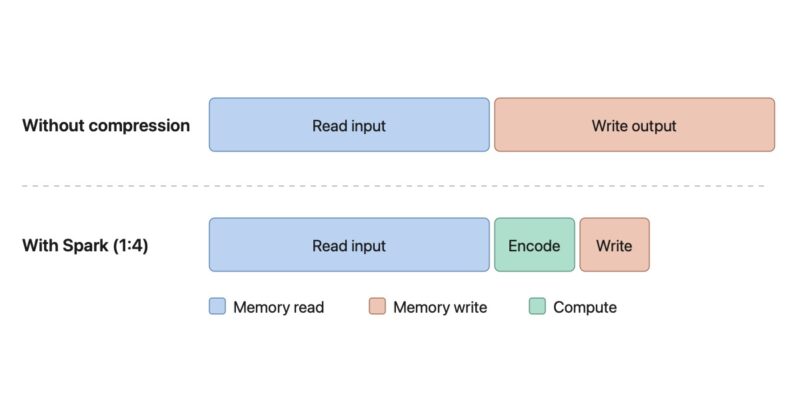
The throughput curve on this device is quite different from the Pixel 8, peaking around 1024–2048 rather than scaling monotonically with size. At large sizes, Spark throughput is actually higher than uncompressed texture uploads. This often happens on bandwidth-limited devices: a plain blit must read the full input and write the same amount of data back out, whereas Spark only writes 1/4 of the input. The memory bandwidth saved on writes is often enough to offset the computational cost of encoding, resulting in higher net throughput.
Conclusions
ARM’s AFRC is the clear winner. It’s not only superior to software implementations like Spark, but it also outperforms all the other vendors across all formats.
| Format | 1:2 RMSE | 1:4 RMSE |
|---|---|---|
| R8 Metal Lossy | 1.8579 | — |
| R8 AFRC | 1.4937 | — |
| R8 PVRIC4 | 3.4346 | — |
| Spark BC4 | 1.7149 | — |
| RG8 Metal Lossy | 3.1757 | — |
| RG8 AFRC | 2.2079 | — |
| RG8 PVRIC4 | 5.4392 | — |
| Spark BC5 | 3.0442 | — |
| RGBA8 Metal Lossy | 1.4947 | — |
| RGBA8 AFRC | 0.6679 | 3.4184 |
| RGBA8 PVRIC4 | 2.3160 | — |
| Spark BC7 | — | 4.2136 |
It’s worth noting that my PVRIC4 results may not reflect the hardware’s full potential. The driver appears to ignore the requested compression ratio and always defaults to 1:2, so I’m hoping to revisit these results once the issue is fixed.
Native hardware compression is a compelling alternative to real-time compression. The main caveat is that it’s currently limited to modern high-end devices, which are also the ones with the most memory and bandwidth to spare.
Even when native hardware compression is available, there are good reasons to continue using Spark. Hardware compression output varies across vendors, and in some cases, as we saw with PVRIC4, the quality falls short of what a real-time encoder can achieve. If consistent, predictable output across all vendors matters for your use case, then Spark remains the right tool.
Finally, it’s worth noting that none of these hardware compression formats are currently exposed through WebGPU. If that changes in the future, extending spark.js to support them would be straightforward. The library could automatically select the best format supported by the underlying hardware, with no changes required from the application.
“I would love to hear from ImgTec if this is a known bug, and whether the hardware supports other compression ratios that are not currently enabled.”
I am sure IMG would love to know too.